Master Modes Guide
Transmission Undefined NoneContent
Master Modes Guide
Star Citizen Alpha 3.23 introduced Master Modes, a feature that mixes different flight modes to maximize the fun and gameplay experience when piloting spacecraft.
Now that all ships have been updated to Master Modes, we distinguish between two main flight modes: Space Combat Maneuvering (SCM) and Navigation (NAV).
Here's a closer look at these flight modes, including how to activate them and when to use each one. We'll also update this page as additional aspects of the new Flight Mechanics come online in the future.
And if you're looking for additional help in the 'verse, check out the Guide System to get paired with an experienced player who can help show you the ropes.
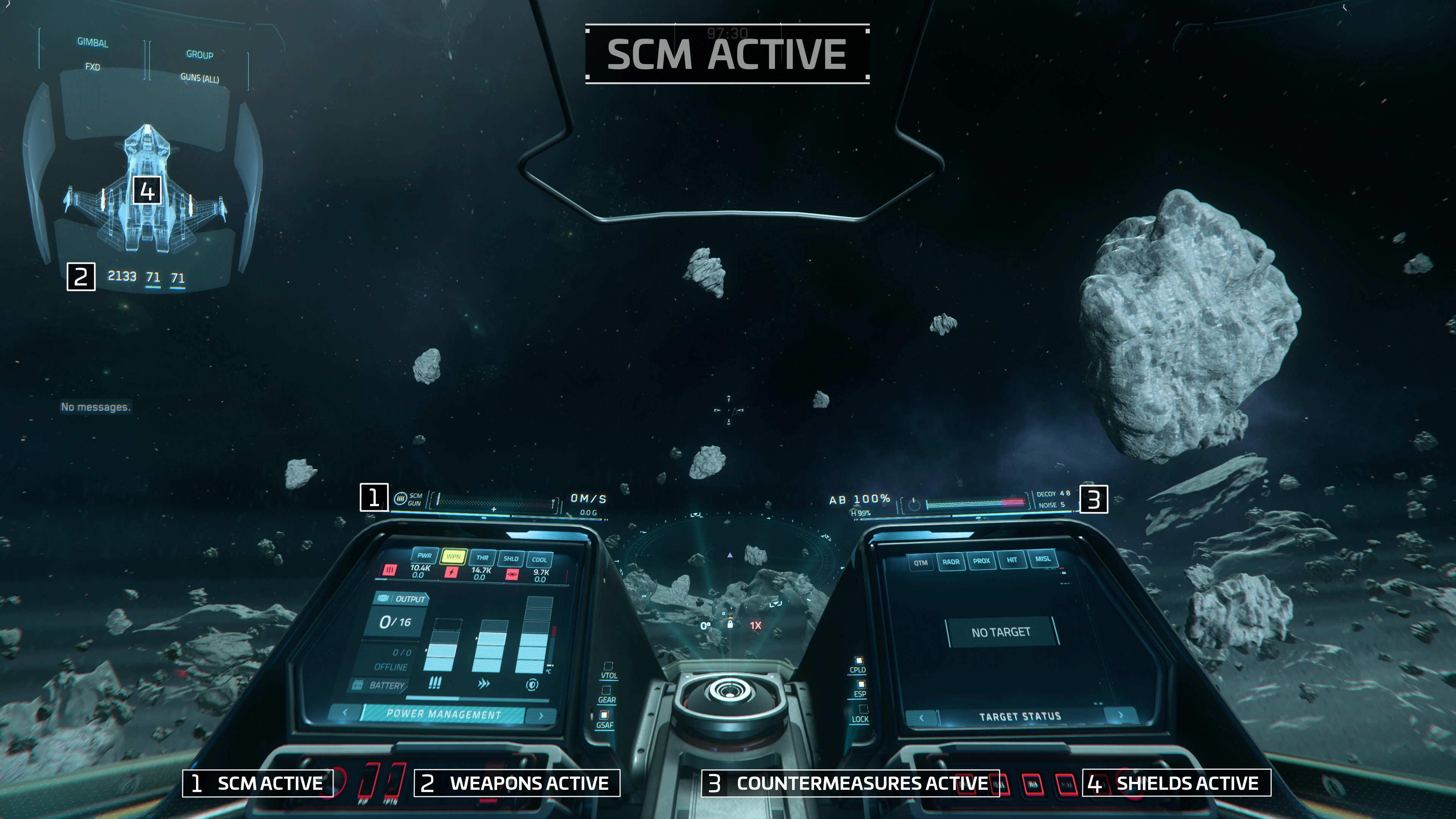
SPACE COMBAT MANEUVERING [SCM]The introduction of Space Combat Maneuvering [SCM] is a significant change to dogfighting that brings ships closer during combat. This results in more intense skirmishes and better aligns ships with their intended roles. For instance, light fighters can now better use their increased maneuverability to evade heavy attacks, whereas gunships can rely on their strong firepower and high defense.Getting Ready For BattleSCM is your default flight mode. Your ship can regenerate its shields and you have full access to its weapon systems and countermeasures.In addition, your ship has maximum maneuverability in this mode, allowing it to weave its way around obstacles and granting you maximum control in both atmospheric and space combat. The Prudent SpecialistWhile SCM offers several benefits, it comes with a significant limitation: the maximum speed of all ships is capped to ensure the optimal balance between forward thrust and maneuverability. This maximum speed varies widely from one ship to another depending on their specific role and size. Additionally, SCM stands out by providing access to a diverse array of Operator Modes, further enhancing its utility.Getting Ready For Battle
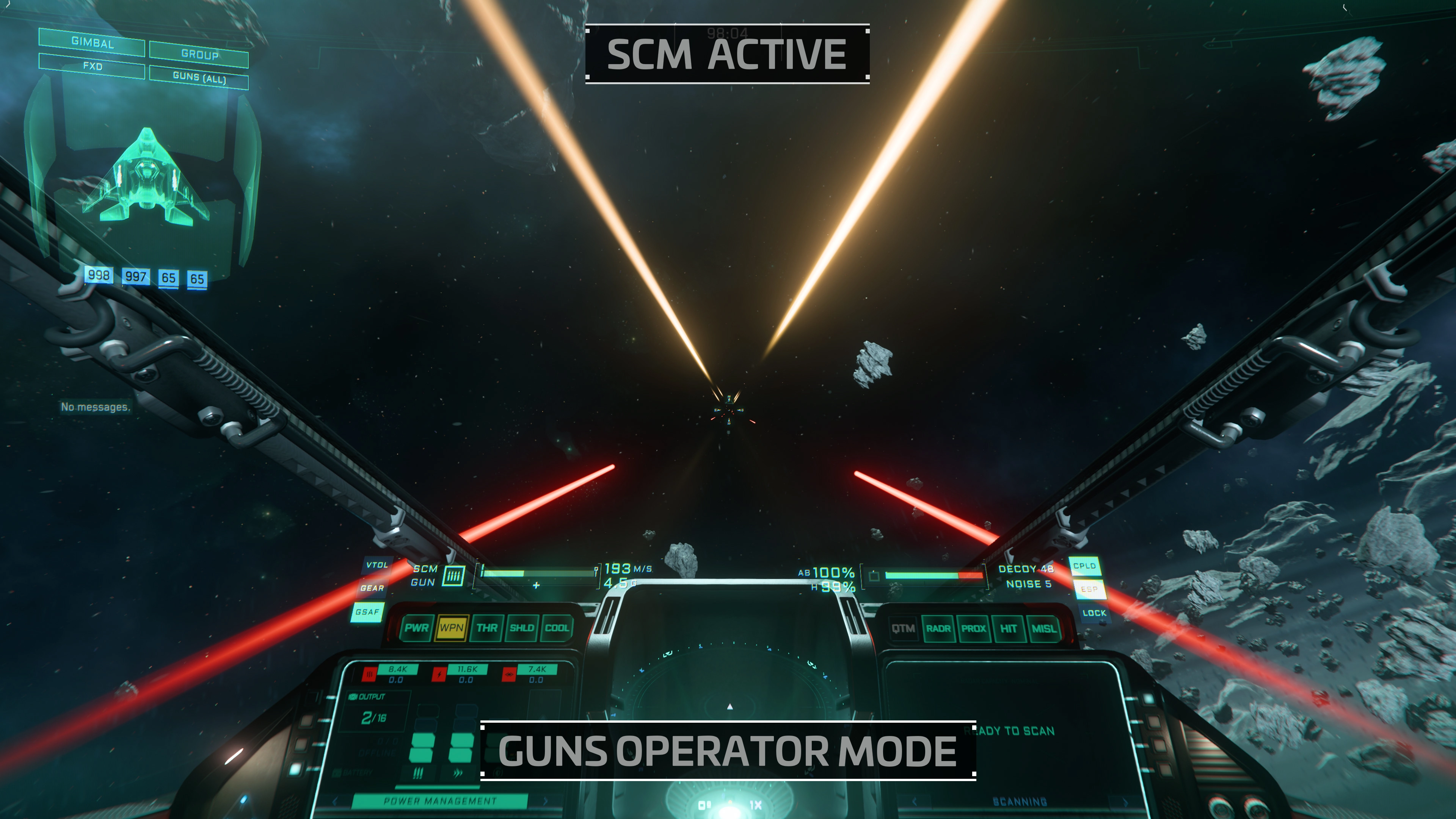
SCM is your default flight mode. Your ship can regenerate its shields and you have full access to its weapon systems and countermeasures.
In addition, your ship has maximum maneuverability in this mode, allowing it to weave its way around obstacles and granting you maximum control in both atmospheric and space combat.
The Prudent Specialist
While SCM offers several benefits, it comes with a significant limitation: the maximum speed of all ships is capped to ensure the optimal balance between forward thrust and maneuverability. This maximum speed varies widely from one ship to another depending on their specific role and size.
Additionally, SCM stands out by providing access to a diverse array of Operator Modes, further enhancing its utility.
Full Control, Operator!
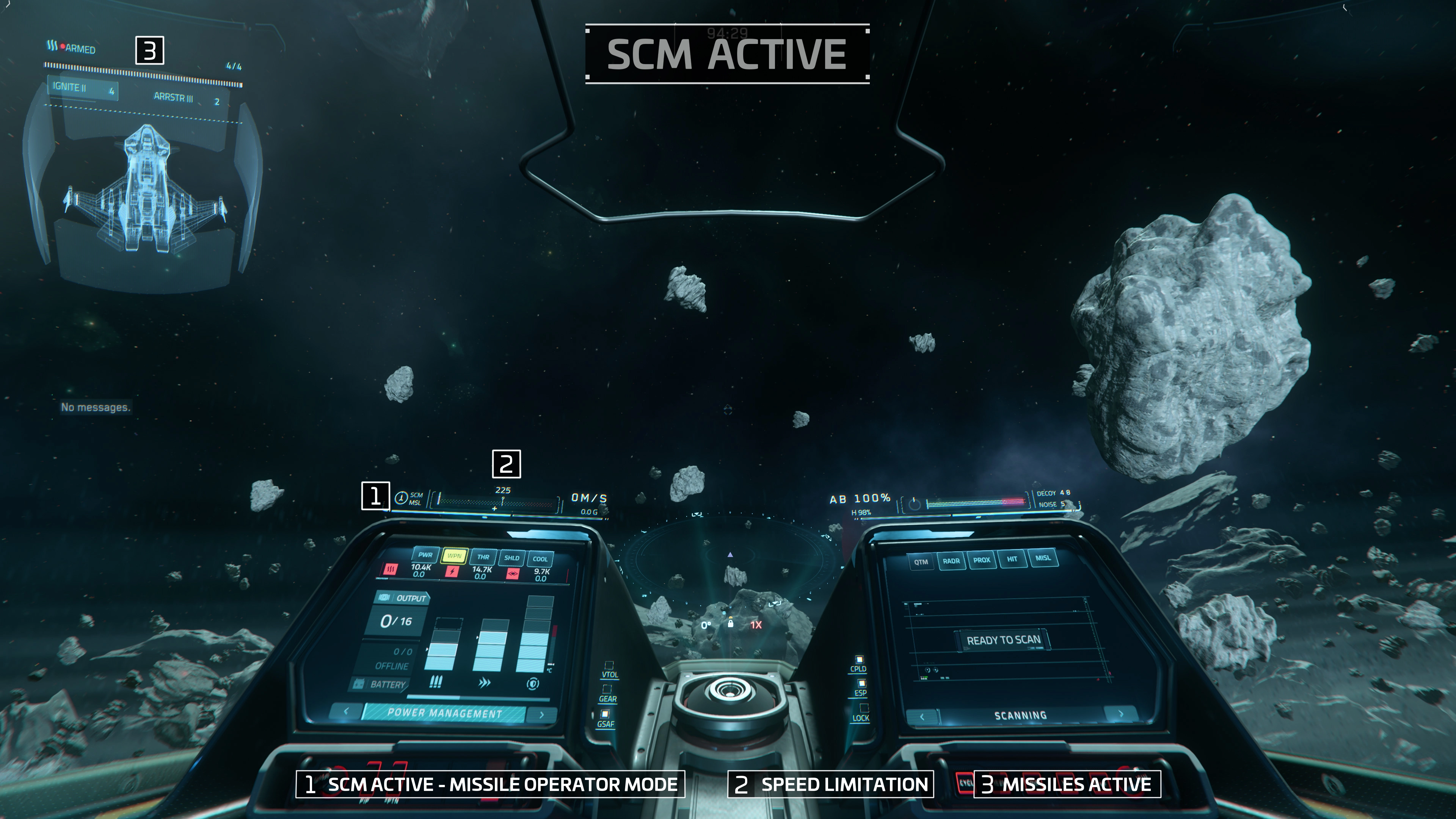
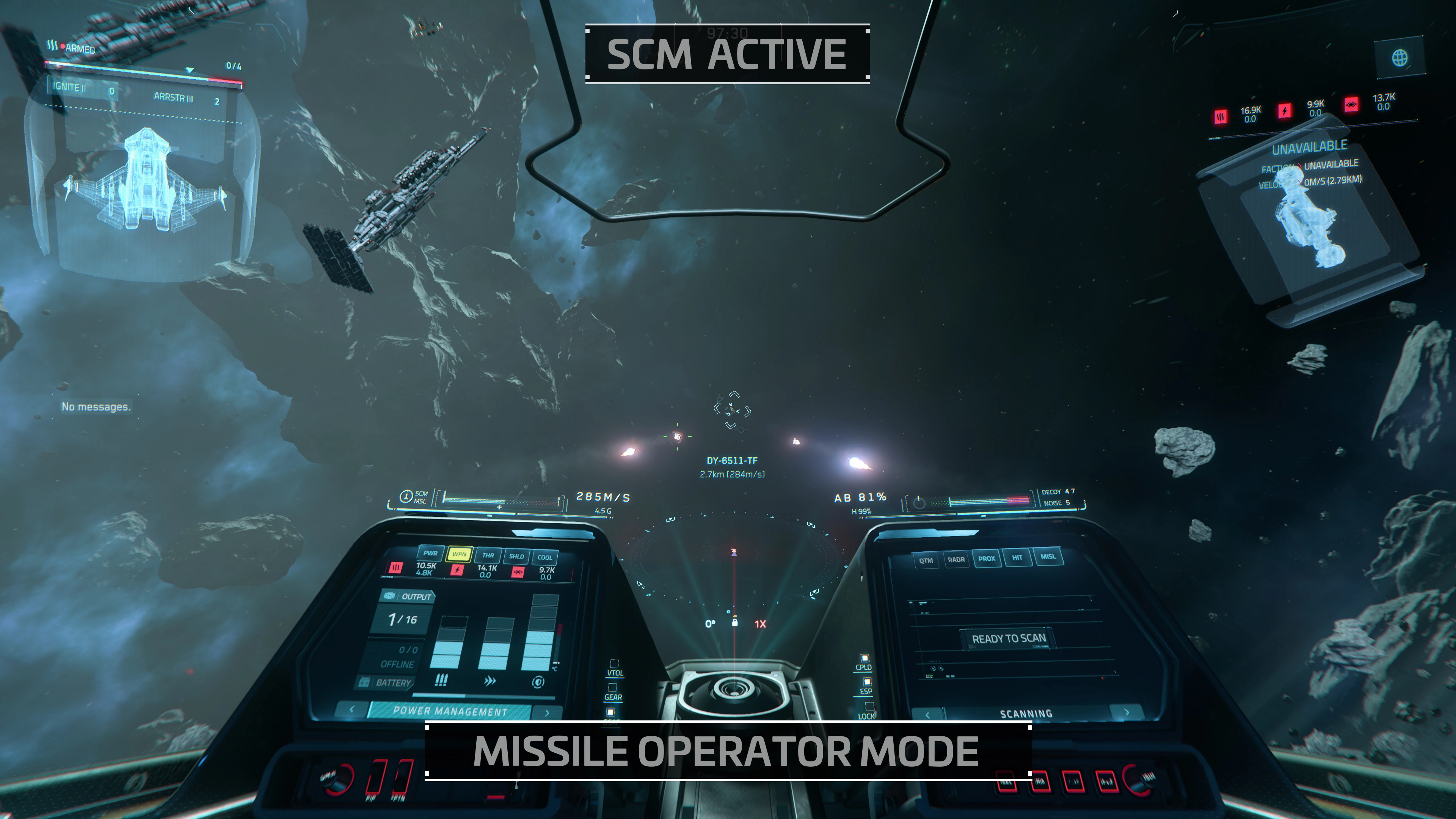
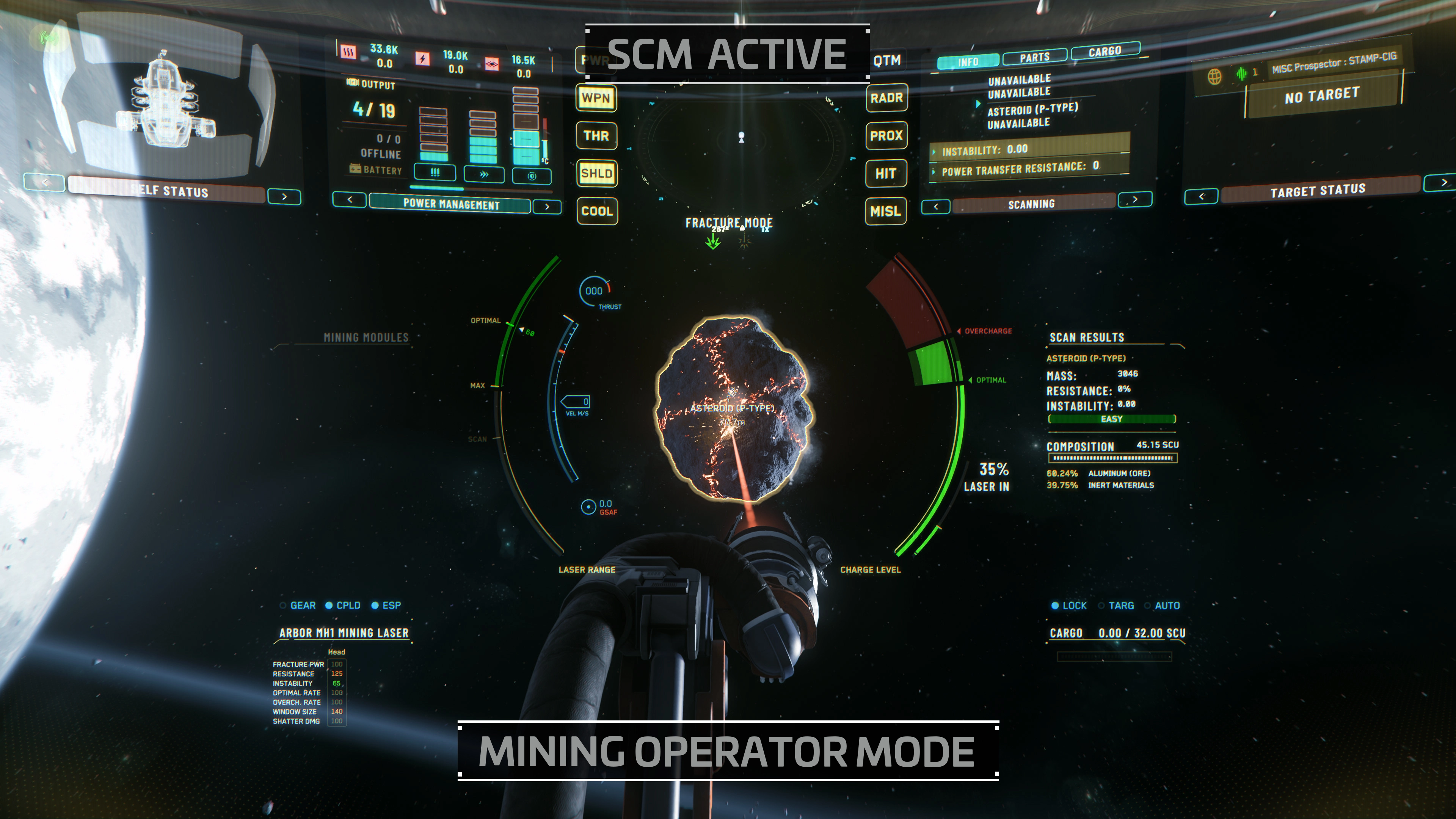
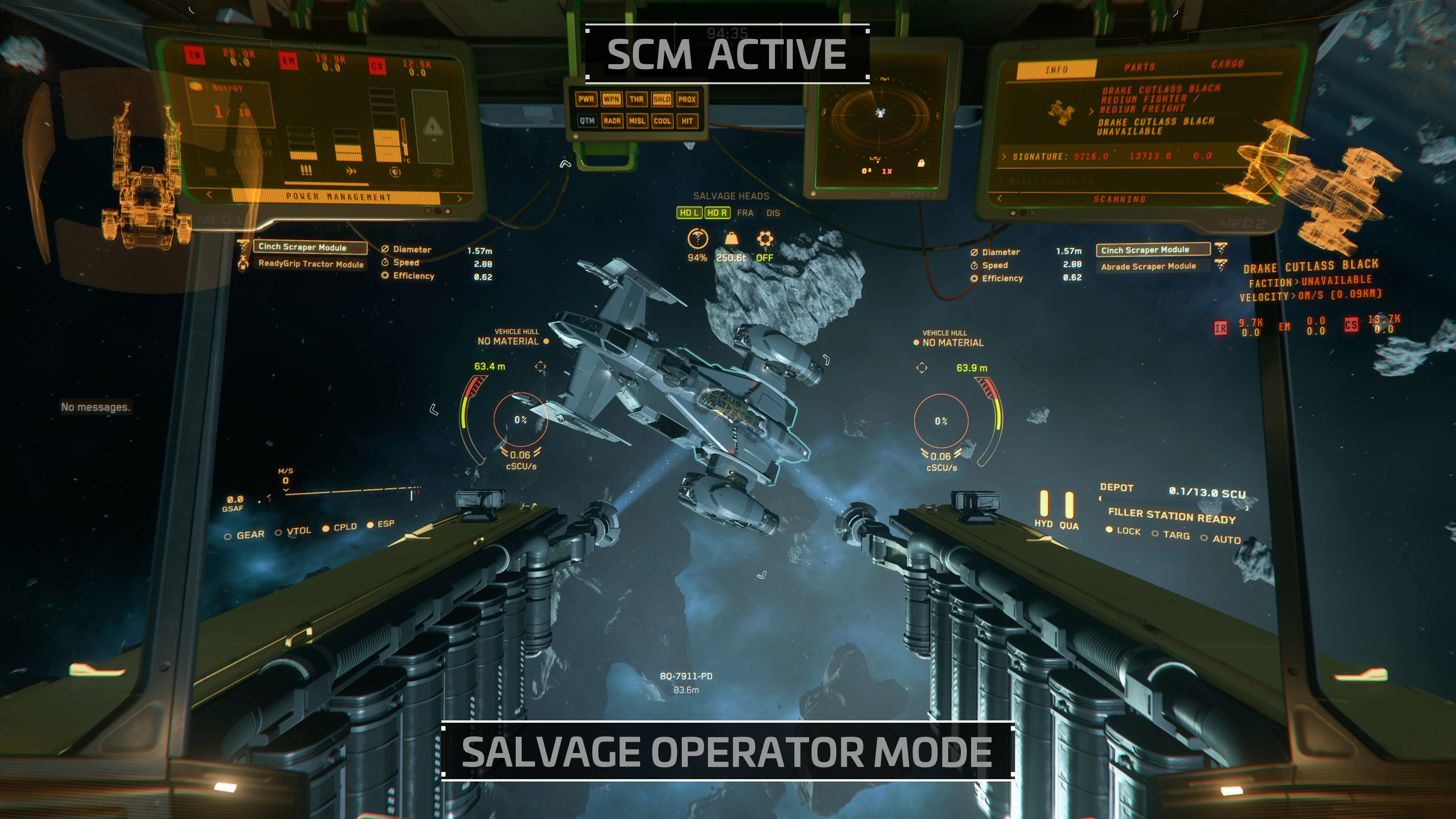
Operator Modes is a feature that allows you to customize the behavior of your cockpit dashboard, tailoring the displayed information to suit specific situations. This functionality gives you immediate access to the most relevant data depending on the context or task at hand. On the top left of your flight HUD, a two-part label displays your current Master Mode [NAV or SCM] and your current Operator Mode. You can cycle through available Operator Modes by pressing the Middle Mouse Button.
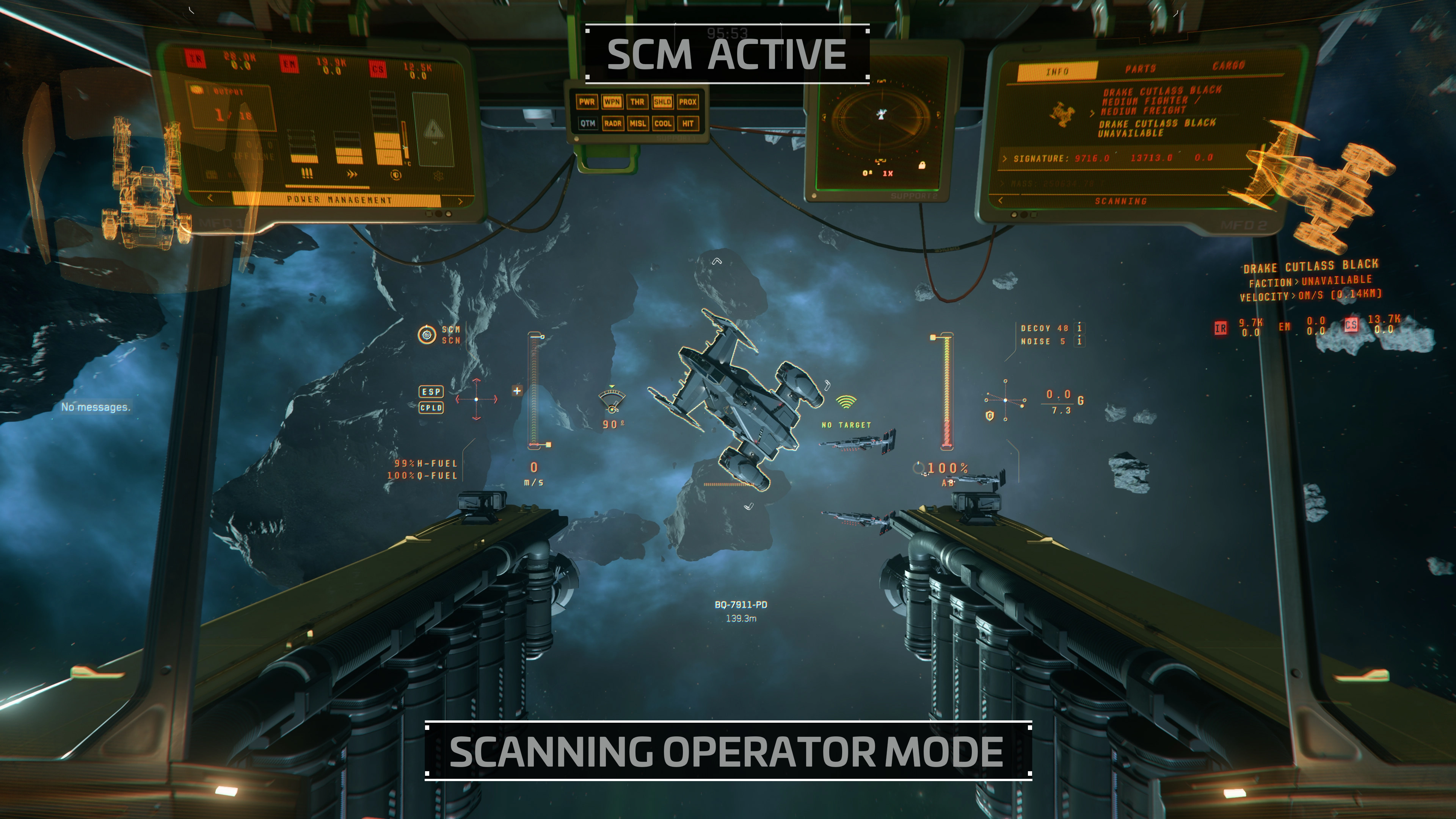
Operator Modes grant you specific access to certain ship functions based on the type and equipment of your vessel, including Guns [GUNS], Missiles [MISL], Scanning [SCN], Mining, and Salvage.
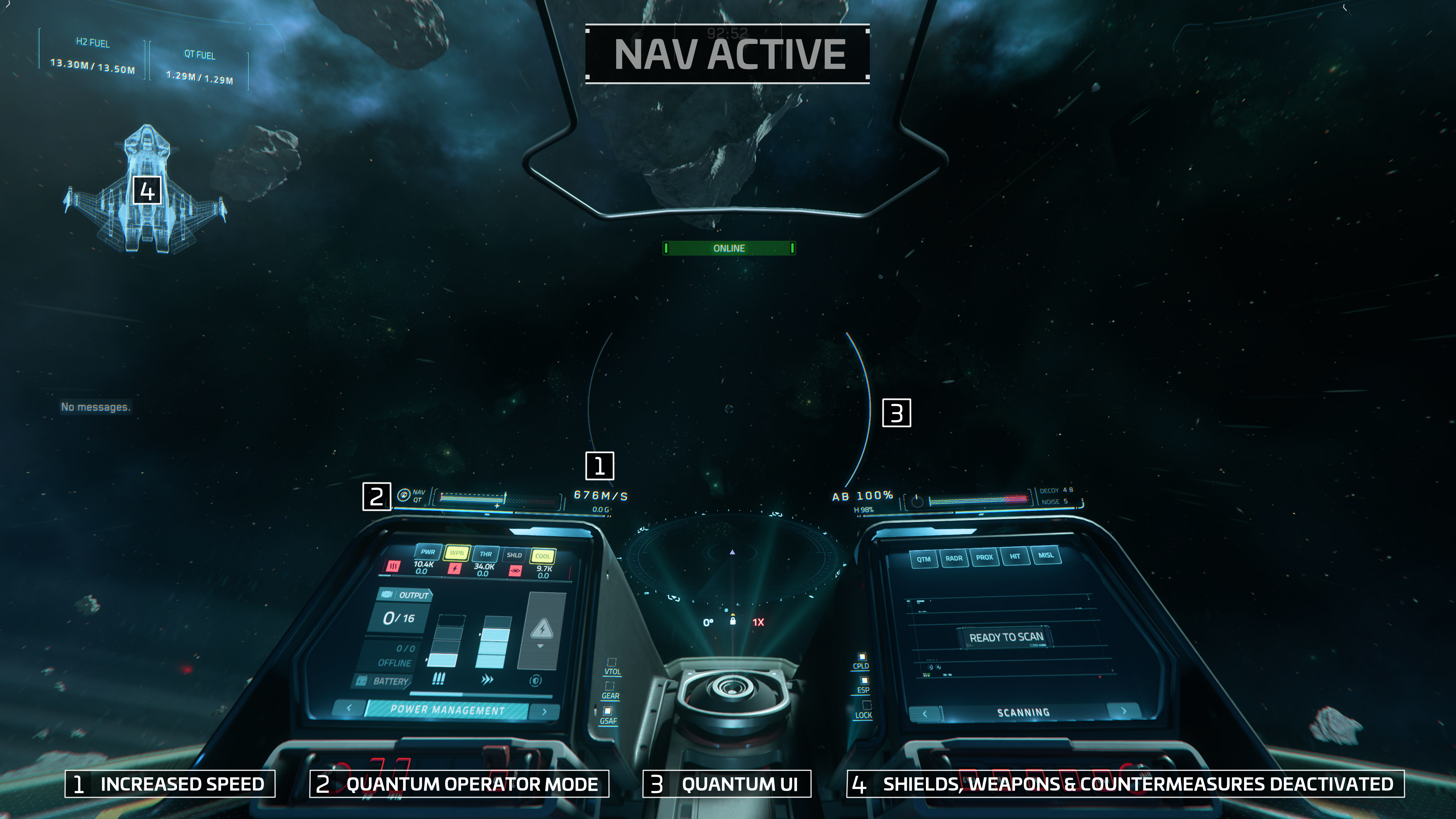
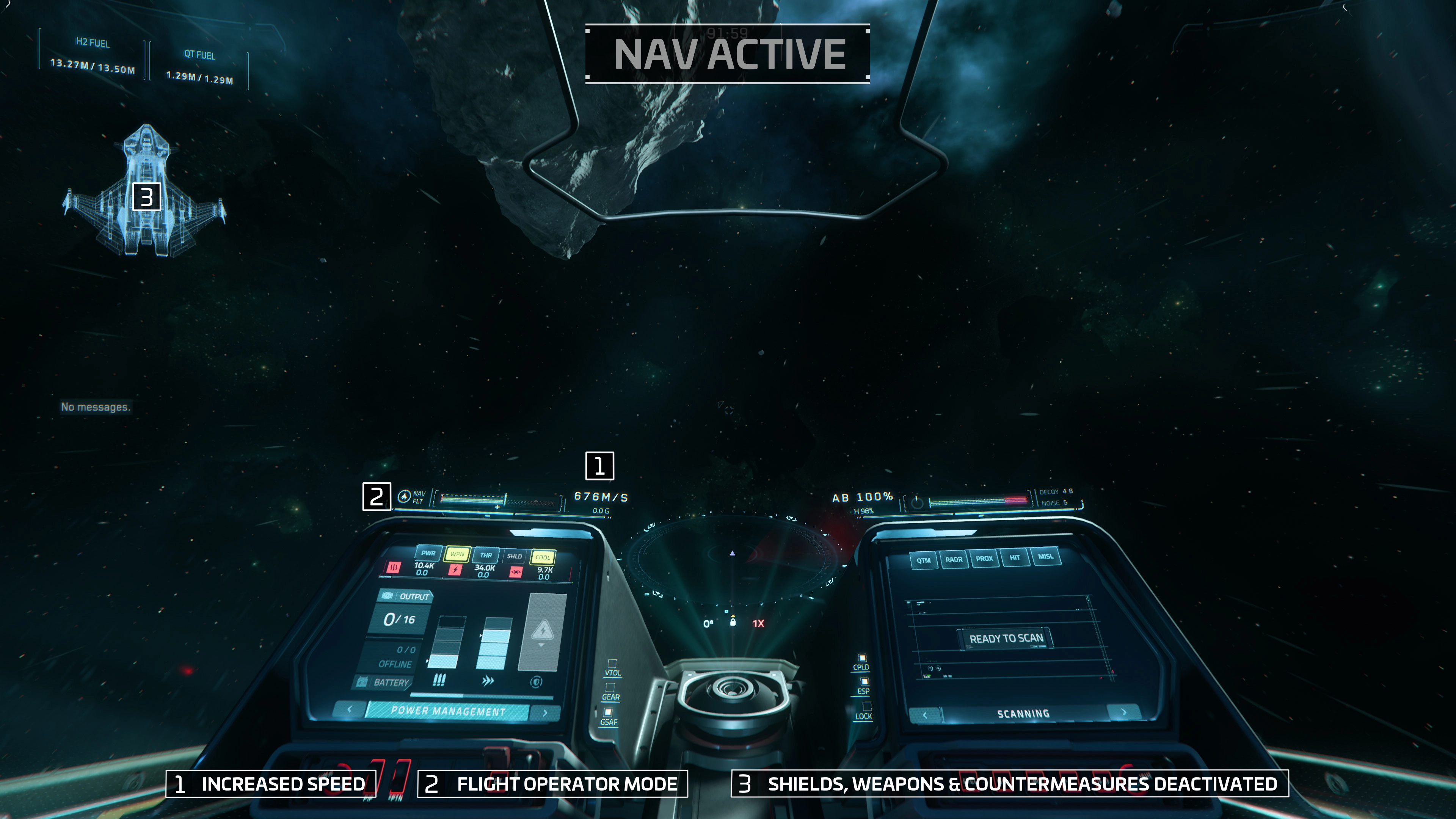
Navigation Mode [NAV]NAV mode is primarily designed for swift traversal or quick escapes. Transition between SCM and NAV by holding down the 'B' key on your keyboard, with a brief delay between mode swaps.Your HUD will display an indicator for the currently utilized mode in the top left corner, including spool time while modes are swapping.To Infinity And Beyond!First things first: In NAV, your shields, weapons, and countermeasures are deactivated. So, you should think carefully about whether and when you switch from SCM to NAV or vice versa. In return, you have high speed at your disposal.The default Operator Mode in NAV is Quantum Operator Mode [QTM], where your quantum drive will automatically spool once you enter NAV mode. To initiate a quantum jump, align yourself with a quantum-jump marker and long-press the Left Mouse Button.Quick And ThoughtfulNAV features two valuable additional modes, accessed by pressing the middle mouse button.In Flight Operator Mode [FLT], you can unleash maximum thrust from your engines. This allows you to focus solely on reaching your destination at high speed or swiftly making an escape, free from the distractions of the Quantum UI.Scanning Operator Mode [SCN] ensures that you don't miss ore deposits, shipwrecks, or enemy ambushes, even at high cruising speeds. To Infinity And Beyond!
First things first: In NAV, your shields, weapons, and countermeasures are deactivated. So, you should think carefully about whether and when you switch from SCM to NAV or vice versa. In return, you have high speed at your disposal.
The default Operator Mode in NAV is Quantum Operator Mode [QTM], where your quantum drive will automatically spool once you enter NAV mode. To initiate a quantum jump, align yourself with a quantum-jump marker and long-press the Left Mouse Button.
Quick And Thoughtful
NAV features two valuable additional modes, accessed by pressing the middle mouse button.
In Flight Operator Mode [FLT], you can unleash maximum thrust from your engines. This allows you to focus solely on reaching your destination at high speed or swiftly making an escape, free from the distractions of the Quantum UI.
Scanning Operator Mode [SCN] ensures that you don't miss ore deposits, shipwrecks, or enemy ambushes, even at high cruising speeds.
With the introduction of the Master Modes, Star Citizen Alpha 3.23 is taking flying and space combat to a whole new level. However, the journey is not over yet, and we will update this guide as we iterate on the various flight modes.
Leitfaden Master-Modi
Alpha 3.23
Mit Star Citizen Alpha 3.23 wurden die Master Modes eingeführt, eine Funktion, die verschiedene Flugmodi mischt, um den Spaß und das Spielerlebnis beim Steuern von Raumschiffen zu maximieren.
Jetzt, wo alle Schiffe auf Master Modes aktualisiert wurden, unterscheiden wir zwischen zwei Hauptflugmodi: Space Combat Maneuvering (SCM) und Navigation (NAV).
Hier werfen wir einen genaueren Blick auf diese Flugmodi, einschließlich der Frage, wie man sie aktiviert und wann man sie benutzt. Wir werden diese Seite aktualisieren, sobald weitere Aspekte der neuen Flugmechanik online gehen.
Und wenn du zusätzliche Hilfe brauchst, kannst du dich im Guide-System mit einem erfahrenen Spieler zusammentun, der dir zeigt, wo es lang geht.
Volle Kontrolle, Operator!
Mit der Funktion Operator Modes kannst du das Verhalten deines Cockpit-Dashboards anpassen und die angezeigten Informationen auf bestimmte Situationen abstimmen. Mit dieser Funktion hast du je nach Kontext oder Aufgabe sofortigen Zugriff auf die wichtigsten Daten. Oben links auf deinem Flight HUD zeigt ein zweiteiliges Etikett deinen aktuellen Master Mode [NAV oder SCM] und deinen aktuellen Operator Mode an. Durch Drücken der mittleren Maustaste kannst du zwischen den verfügbaren Operator-Modi wechseln.
Die Operator-Modi gewähren dir je nach Typ und Ausrüstung deines Schiffes besonderen Zugriff auf bestimmte Schiffsfunktionen, z. B. Geschütze [GUNS], Raketen [MISL], Scannen [SCN], Bergbau und Bergung.
RAUMKAMPF-MANÖVER [SCM]
Die Einführung des Space Combat Maneuvering [SCM] ist eine bedeutende Änderung des Dogfights, die Schiffe im Kampf näher zusammenrücken lässt. Dies führt zu intensiveren Scharmützeln und richtet die Schiffe besser auf die ihnen zugedachte Rolle aus. Leichte Raumjäger können jetzt zum Beispiel ihre erhöhte Manövrierfähigkeit besser nutzen, um schweren Angriffen auszuweichen, während Kampfschiffe sich auf ihre starke Feuerkraft und hohe Verteidigung verlassen können.
Bereit für die Schlacht
Der umsichtige Spezialist
Bereit für die Schlacht
SCM ist dein Standardflugmodus. Dein Schiff kann seine Schilde regenerieren und du hast vollen Zugriff auf seine Waffensysteme und Gegenmaßnahmen.
Außerdem ist dein Schiff in diesem Modus maximal manövrierfähig, so dass es sich um Hindernisse herumschlängeln kann und du sowohl in der Atmosphäre als auch im Weltraum maximale Kontrolle hast.
Der umsichtige Spezialist
Der SCM-Modus bietet zwar viele Vorteile, hat aber auch eine wichtige Einschränkung: Die Höchstgeschwindigkeit aller Schiffe ist begrenzt, um ein optimales Gleichgewicht zwischen Vorwärtsdrang und Manövrierfähigkeit zu gewährleisten. Diese Höchstgeschwindigkeit ist von Schiff zu Schiff sehr unterschiedlich und hängt von der jeweiligen Rolle und Größe ab.
Außerdem zeichnet sich der SCM dadurch aus, dass er Zugang zu einer Vielzahl von Operator-Modi bietet, was seinen Nutzen noch erhöht.
Navigationsmodus [NAV]
Der NAV-Modus ist in erster Linie für schnelles Durchqueren oder schnelles Entkommen gedacht. Du kannst zwischen SCM und NAV wechseln, indem du die Taste "B" auf deiner Tastatur gedrückt hältst, wobei es eine kurze Verzögerung zwischen den Modi gibt.
Dein HUD zeigt in der oberen linken Ecke eine Anzeige für den aktuell genutzten Modus an, einschließlich der Spoolzeit, während der Modus gewechselt wird.
Bis zur Unendlichkeit und darüber hinaus!
Schnell und durchdacht
Bis zur Unendlichkeit und darüber hinaus!
Das Wichtigste zuerst: Im NAV sind deine Schilde, Waffen und Gegenmaßnahmen deaktiviert. Du solltest dir also gut überlegen, ob und wann du von SCM zu NAV oder umgekehrt wechselst. Im Gegenzug steht dir eine hohe Geschwindigkeit zur Verfügung.
Der Standard-Operator-Modus in NAV ist der Quanten-Operator-Modus [QTM], in dem dein Quantenantrieb automatisch spult, sobald du in den NAV-Modus wechselst. Um einen Quantensprung auszulösen, musst du dich auf eine Quantensprungmarkierung ausrichten und die linke Maustaste lange drücken.
Schnell und durchdacht
NAV bietet zwei wertvolle zusätzliche Modi, die du durch Drücken der mittleren Maustaste aufrufen kannst.
Im Flight Operator Mode [FLT] kannst du die maximale Schubkraft deiner Triebwerke entfesseln. So kannst du dich ganz darauf konzentrieren, dein Ziel mit hoher Geschwindigkeit zu erreichen oder schnell zu fliehen, frei von den Ablenkungen der Quantum-Benutzeroberfläche.
Der Scanning Operator Mode [SCN] stellt sicher, dass du auch bei hoher Reisegeschwindigkeit keine Erzvorkommen, Schiffswracks oder feindliche Hinterhalte übersiehst.
Master Modes Guide
Star Citizen Alpha 3.23 introduced Master Modes, a feature that mixes different flight modes to maximize the fun and gameplay experience when piloting spacecraft.
Now that all ships have been updated to Master Modes, we distinguish between two main flight modes: Space Combat Maneuvering (SCM) and Navigation (NAV).
Here's a closer look at these flight modes, including how to activate them and when to use each one. We'll also update this page as additional aspects of the new Flight Mechanics come online in the future.
And if you're looking for additional help in the 'verse, check out the Guide System to get paired with an experienced player who can help show you the ropes.
SPACE COMBAT MANEUVERING [SCM]The introduction of Space Combat Maneuvering [SCM] is a significant change to dogfighting that brings ships closer during combat. This results in more intense skirmishes and better aligns ships with their intended roles. For instance, light fighters can now better use their increased maneuverability to evade heavy attacks, whereas gunships can rely on their strong firepower and high defense.Getting Ready For BattleSCM is your default flight mode. Your ship can regenerate its shields and you have full access to its weapon systems and countermeasures.In addition, your ship has maximum maneuverability in this mode, allowing it to weave its way around obstacles and granting you maximum control in both atmospheric and space combat. The Prudent SpecialistWhile SCM offers several benefits, it comes with a significant limitation: the maximum speed of all ships is capped to ensure the optimal balance between forward thrust and maneuverability. This maximum speed varies widely from one ship to another depending on their specific role and size. Additionally, SCM stands out by providing access to a diverse array of Operator Modes, further enhancing its utility.Getting Ready For Battle
SCM is your default flight mode. Your ship can regenerate its shields and you have full access to its weapon systems and countermeasures.
In addition, your ship has maximum maneuverability in this mode, allowing it to weave its way around obstacles and granting you maximum control in both atmospheric and space combat.
The Prudent Specialist
While SCM offers several benefits, it comes with a significant limitation: the maximum speed of all ships is capped to ensure the optimal balance between forward thrust and maneuverability. This maximum speed varies widely from one ship to another depending on their specific role and size.
Additionally, SCM stands out by providing access to a diverse array of Operator Modes, further enhancing its utility.
Full Control, Operator!
Operator Modes is a feature that allows you to customize the behavior of your cockpit dashboard, tailoring the displayed information to suit specific situations. This functionality gives you immediate access to the most relevant data depending on the context or task at hand. On the top left of your flight HUD, a two-part label displays your current Master Mode [NAV or SCM] and your current Operator Mode. You can cycle through available Operator Modes by pressing the Middle Mouse Button.
Operator Modes grant you specific access to certain ship functions based on the type and equipment of your vessel, including Guns [GUNS], Missiles [MISL], Scanning [SCN], Mining, and Salvage.
Navigation Mode [NAV]NAV mode is primarily designed for swift traversal or quick escapes. Transition between SCM and NAV by holding down the 'B' key on your keyboard, with a brief delay between mode swaps.Your HUD will display an indicator for the currently utilized mode in the top left corner, including spool time while modes are swapping.To Infinity And Beyond!First things first: In NAV, your shields, weapons, and countermeasures are deactivated. So, you should think carefully about whether and when you switch from SCM to NAV or vice versa. In return, you have high speed at your disposal.The default Operator Mode in NAV is Quantum Operator Mode [QTM], where your quantum drive will automatically spool once you enter NAV mode. To initiate a quantum jump, align yourself with a quantum-jump marker and long-press the Left Mouse Button.Quick And ThoughtfulNAV features two valuable additional modes, accessed by pressing the middle mouse button.In Flight Operator Mode [FLT], you can unleash maximum thrust from your engines. This allows you to focus solely on reaching your destination at high speed or swiftly making an escape, free from the distractions of the Quantum UI.Scanning Operator Mode [SCN] ensures that you don't miss ore deposits, shipwrecks, or enemy ambushes, even at high cruising speeds. To Infinity And Beyond!
First things first: In NAV, your shields, weapons, and countermeasures are deactivated. So, you should think carefully about whether and when you switch from SCM to NAV or vice versa. In return, you have high speed at your disposal.
The default Operator Mode in NAV is Quantum Operator Mode [QTM], where your quantum drive will automatically spool once you enter NAV mode. To initiate a quantum jump, align yourself with a quantum-jump marker and long-press the Left Mouse Button.
Quick And Thoughtful
NAV features two valuable additional modes, accessed by pressing the middle mouse button.
In Flight Operator Mode [FLT], you can unleash maximum thrust from your engines. This allows you to focus solely on reaching your destination at high speed or swiftly making an escape, free from the distractions of the Quantum UI.
Scanning Operator Mode [SCN] ensures that you don't miss ore deposits, shipwrecks, or enemy ambushes, even at high cruising speeds.
With the introduction of the Master Modes, Star Citizen Alpha 3.23 is taking flying and space combat to a whole new level. However, the journey is not over yet, and we will update this guide as we iterate on the various flight modes.
Master Modes Guide
Star Citizen Alpha 3.23 introduced Master Modes, a feature that mixes different flight modes to maximize the fun and gameplay experience when piloting spacecraft.
Now that all ships have been updated to Master Modes, we distinguish between two main flight modes: Space Combat Maneuvering (SCM) and Navigation (NAV).
Here's a closer look at these flight modes, including how to activate them and when to use each one. We'll also update this page as additional aspects of the new Flight Mechanics come online in the future.
And if you're looking for additional help in the 'verse, check out the Guide System to get paired with an experienced player who can help show you the ropes.
SPACE COMBAT MANEUVERING [SCM]The introduction of Space Combat Maneuvering [SCM] is a significant change to dogfighting that brings ships closer during combat. This results in more intense skirmishes and better aligns ships with their intended roles. For instance, light fighters can now better use their increased maneuverability to evade heavy attacks, whereas gunships can rely on their strong firepower and high defense.Getting Ready For BattleSCM is your default flight mode. Your ship can regenerate its shields and you have full access to its weapon systems and countermeasures.In addition, your ship has maximum maneuverability in this mode, allowing it to weave its way around obstacles and granting you maximum control in both atmospheric and space combat. The Prudent SpecialistWhile SCM offers several benefits, it comes with a significant limitation: the maximum speed of all ships is capped to ensure the optimal balance between forward thrust and maneuverability. This maximum speed varies widely from one ship to another depending on their specific role and size. Additionally, SCM stands out by providing access to a diverse array of Operator Modes, further enhancing its utility.Getting Ready For Battle
SCM is your default flight mode. Your ship can regenerate its shields and you have full access to its weapon systems and countermeasures.
In addition, your ship has maximum maneuverability in this mode, allowing it to weave its way around obstacles and granting you maximum control in both atmospheric and space combat.
The Prudent Specialist
While SCM offers several benefits, it comes with a significant limitation: the maximum speed of all ships is capped to ensure the optimal balance between forward thrust and maneuverability. This maximum speed varies widely from one ship to another depending on their specific role and size.
Additionally, SCM stands out by providing access to a diverse array of Operator Modes, further enhancing its utility.
Full Control, Operator!
Operator Modes is a feature that allows you to customize the behavior of your cockpit dashboard, tailoring the displayed information to suit specific situations. This functionality gives you immediate access to the most relevant data depending on the context or task at hand. On the top left of your flight HUD, a two-part label displays your current Master Mode [NAV or SCM] and your current Operator Mode. You can cycle through available Operator Modes by pressing the Middle Mouse Button.
Operator Modes grant you specific access to certain ship functions based on the type and equipment of your vessel, including Guns [GUNS], Missiles [MISL], Scanning [SCN], Mining, and Salvage.
Navigation Mode [NAV]NAV mode is primarily designed for swift traversal or quick escapes. Transition between SCM and NAV by holding down the 'B' key on your keyboard, with a brief delay between mode swaps.Your HUD will display an indicator for the currently utilized mode in the top left corner, including spool time while modes are swapping.To Infinity And Beyond!First things first: In NAV, your shields, weapons, and countermeasures are deactivated. So, you should think carefully about whether and when you switch from SCM to NAV or vice versa. In return, you have high speed at your disposal.The default Operator Mode in NAV is Quantum Operator Mode [QTM], where your quantum drive will automatically spool once you enter NAV mode. To initiate a quantum jump, align yourself with a quantum-jump marker and long-press the Left Mouse Button.Quick And ThoughtfulNAV features two valuable additional modes, accessed by pressing the middle mouse button.In Flight Operator Mode [FLT], you can unleash maximum thrust from your engines. This allows you to focus solely on reaching your destination at high speed or swiftly making an escape, free from the distractions of the Quantum UI.Scanning Operator Mode [SCN] ensures that you don't miss ore deposits, shipwrecks, or enemy ambushes, even at high cruising speeds. To Infinity And Beyond!
First things first: In NAV, your shields, weapons, and countermeasures are deactivated. So, you should think carefully about whether and when you switch from SCM to NAV or vice versa. In return, you have high speed at your disposal.
The default Operator Mode in NAV is Quantum Operator Mode [QTM], where your quantum drive will automatically spool once you enter NAV mode. To initiate a quantum jump, align yourself with a quantum-jump marker and long-press the Left Mouse Button.
Quick And Thoughtful
NAV features two valuable additional modes, accessed by pressing the middle mouse button.
In Flight Operator Mode [FLT], you can unleash maximum thrust from your engines. This allows you to focus solely on reaching your destination at high speed or swiftly making an escape, free from the distractions of the Quantum UI.
Scanning Operator Mode [SCN] ensures that you don't miss ore deposits, shipwrecks, or enemy ambushes, even at high cruising speeds.
With the introduction of the Master Modes, Star Citizen Alpha 3.23 is taking flying and space combat to a whole new level. However, the journey is not over yet, and we will update this guide as we iterate on the various flight modes.
Links
No links available.
Images
10
Metadata
- CIG ID
- 20053
- Channel
- Transmission
- Category
- Undefined
- Series
- None
- Comments
- 0
- Published
- 4 months ago (2026-05-25T11:00:00+00:00)